
MotorLink
Platforms
Categories
DFRobot M0601 Hub Motor For AGV Interfacing RS485
Complete Guide to Interfacing the DFRobot M0601 Hub Motor (RS485)
In this comprehensive tutorial, you will learn how to interface the DFRobot M0601 Motor (Direct-Drive Hub Motor for AGV) using the RS485 communication protocol. We will guide you step-by-step through testing the motor with raw Hex commands, automating movements with Python scripts, and finally controlling it via MotorLink—an intuitive, browser-based digital twin application.
MotorLink Web App

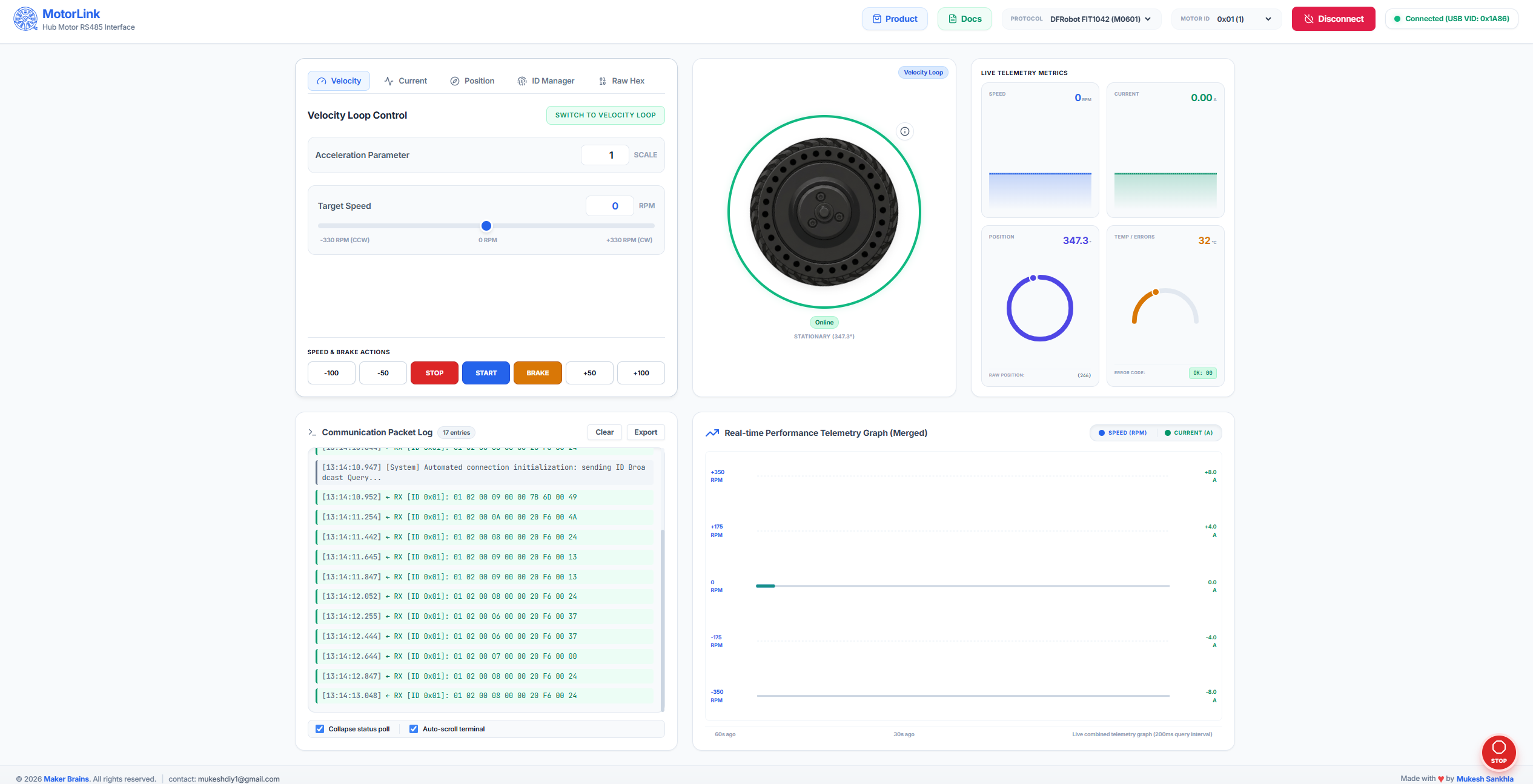
MotorLink is a free, open browser-based control application designed to simplify interfacing with the M0601 Motor. It handles all RS485 protocol complexity automatically using the Web Serial API, requiring no software installation or backend.
Key Features:
- Digital Twin Visualization: Real-time on-screen sync of the motor's movement.
- Full Motor Control: Intuitive sliders and presets for Velocity, Current, and Position loop modes.
- Live Telemetry & Graphs: Monitor speed, current, position, and temperature in real time.
- Advanced Tools: Integrated ID manager, raw hex editor, and communication packet log.

Supplies
- 1x M0601
- 1x Rainbowlink
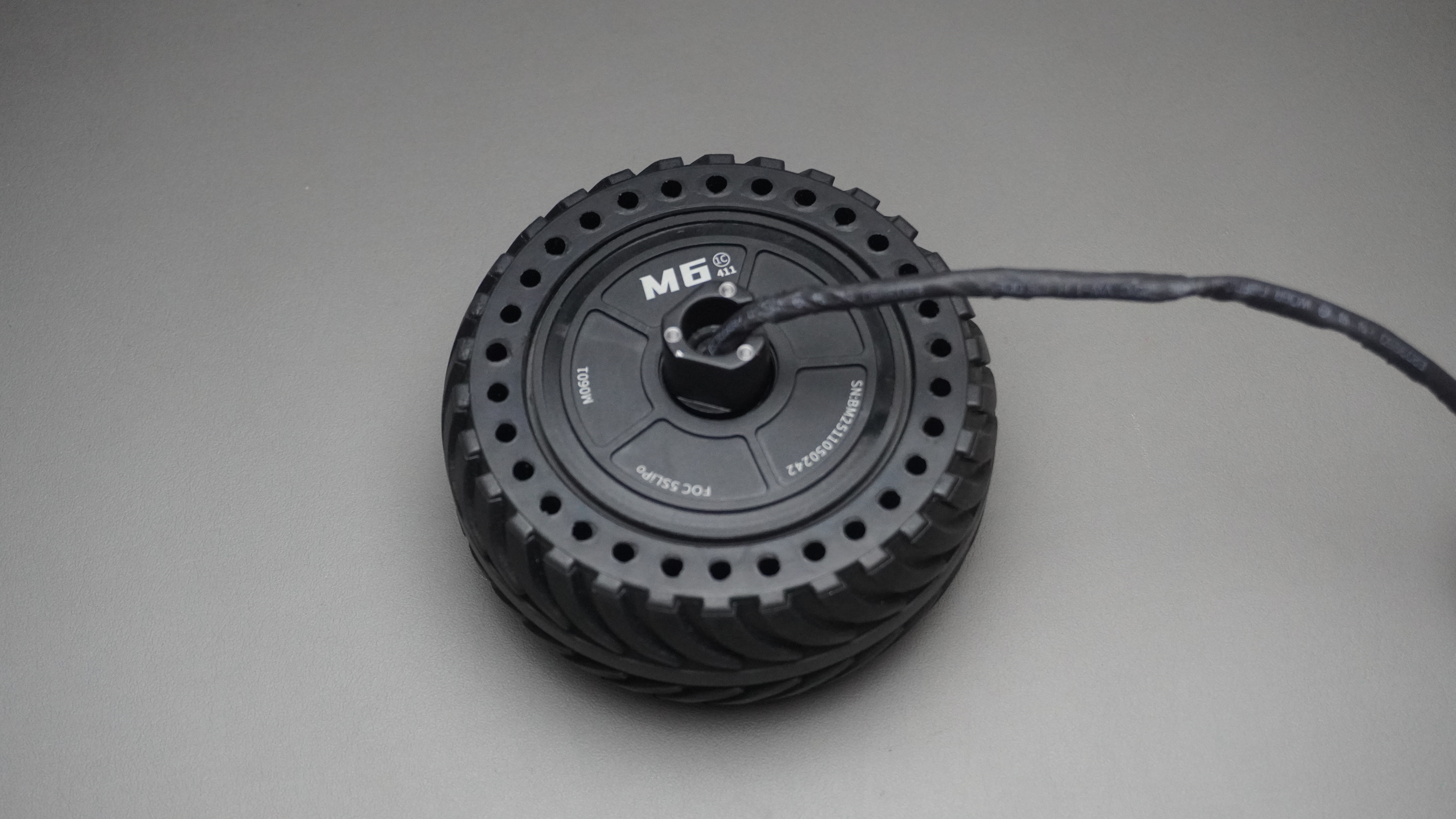
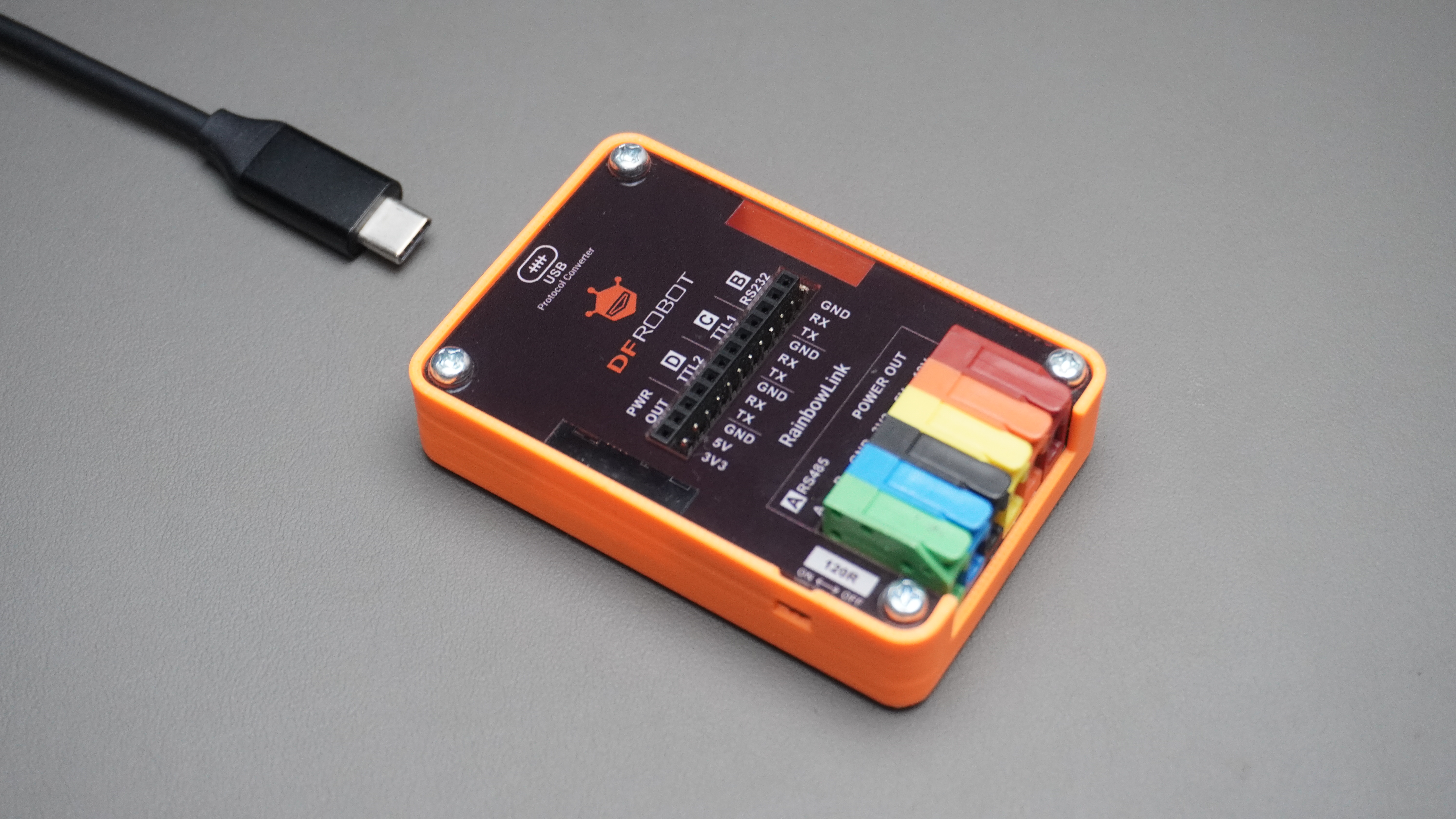
Table of Contents
- Motor Overview
- Versions — Left & Right Orientation
- Specifications
- Applications
- Pinout & Wiring
- Interfacing via RS485
- Interfacing with RainbowLink (TEL0185)
- Communication Protocol
- Verified Command Reference
- Feedback Frame Decoding
- Protection Rules
- Python Code Examples
- MotorLink — Web Control Application
- Safety Notice
1. Motor Overview
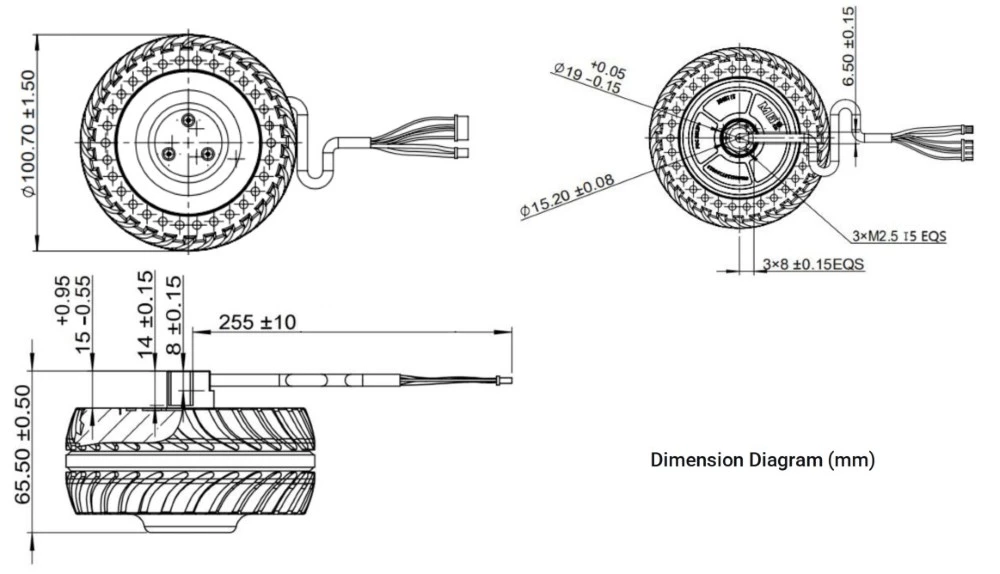
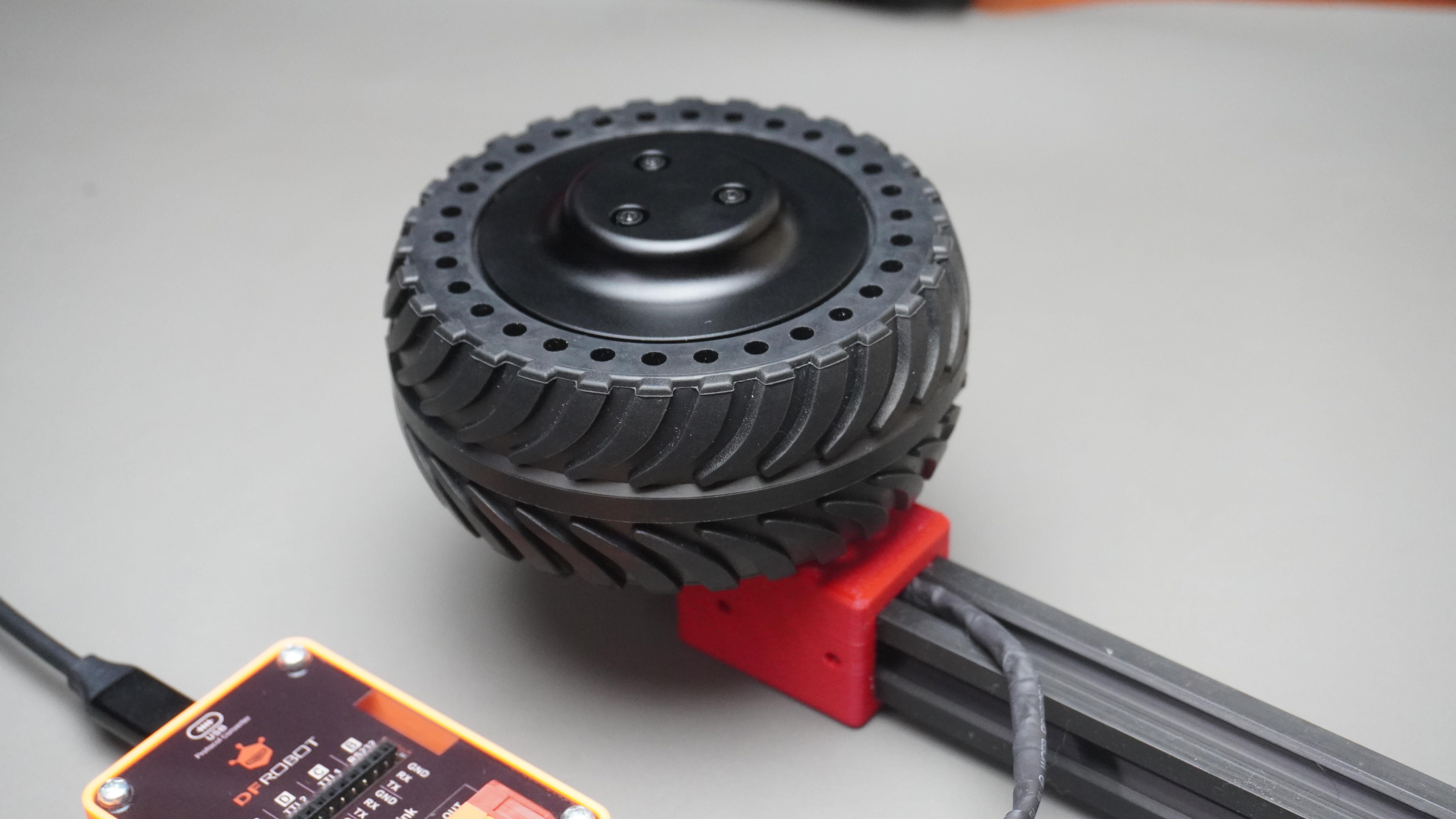
The M0601 is a high-performance direct-drive hub motor from DFRobot's FIT1042 series. Based on an integrated FOC (Field-Oriented Control) servo architecture, it combines an outer-rotor brushless motor, encoder, and servo driver into a single compact unit — eliminating the need for external reducers and delivering smooth, low-noise torque directly to the wheel.
Unlike conventional geared motors, the M0601 uses direct-drive technology, meaning the wheel is the rotor. This gives it:
- Zero backlash and near-zero mechanical losses
- Ultra-low noise (suitable for indoor environments)
- Smooth torque at low RPM without cogging
- Precise closed-loop control at up to 500Hz command rate
Communication is entirely over RS485 using a compact 10-byte frame protocol, making it simple to integrate with any microcontroller, single-board computer, or PC via a USB-to-RS485 adapter.
2. Versions — Left & Right Orientation
The M0601 is available in two mirror-image variants to suit different chassis and robot designs:
| Version | SKU | Mounting | Tire Pattern Direction | Typical Use |
|---|---|---|---|---|
| Left Orientation | FIT1042-L | Left side of chassis | Counter-clockwise tread | Left wheel of differential drive |
| Right Orientation | FIT1042-R | Right side of chassis | Clockwise tread | Right wheel of differential drive |
Note: The rubber tires have a directional tread pattern. If you need to change the tire angle, remove the 3× M2.5×8 hex screws on the front black cover, detach the cover, remove the tire, rotate it to the correct orientation, and reinstall.
The two versions are mechanically and electrically identical — only the tire mounting direction differs. Either motor can be commanded to spin in either direction via the sign of the velocity/current value.
3. Specifications
| Parameter | Value |
|---|---|
| Rated Voltage | 18V DC |
| Power Supply Range | 12V minimum / 18V rated |
| No-load Speed | 200 ± 10 RPM |
| No-load Current | ≤ 0.2A |
| Velocity Loop Range | −330 to +330 RPM |
| Current Loop Range | −32767 to +32767 (= −8A to +8A) |
| Position Loop Range | 0 to 32767 (= 0° to 360°) |
| Communication | RS485, 115200 baud, 8N1 |
| Command Rate | Up to 500Hz |
| Frame Length | 10 bytes |
| CRC Algorithm | CRC-8/MAXIM (poly x⁸ + x⁵ + x⁴ + 1) |
| Over-temperature Protection | 80°C (releases at 75°C) |
| Bus Overcurrent Protection | 3A (releases after 5s) |
| Phase Current Protection | 4.6A (releases after 5s) |
| Stall Protection | Triggers after 5s, releases after 5s |
| Mounting Thread | M2.5, 6mm deep |
| Positioning | 15.2mm diameter outer circle, 8mm flat |
4. Applications
The M0601's combination of direct drive, RS485 multi-drop, and three control modes makes it ideal for:
- Mobile Robots — AGV drive wheels, differential-drive and holonomic platforms
- Balance Robots — Precise velocity control for self-balancing systems
- Robot Joints — Torque-controlled arms and legs using current loop mode
- Service Robots — Indoor delivery, hospitality, security patrol robots
- Fitness Equipment — Smart resistance wheels with torque feedback
- Camera Sliders / Gimbals — Position loop for repeatable angular control
- Industrial Automation — Conveyor drive wheels on a shared RS485 bus
5. Pinout & Wiring
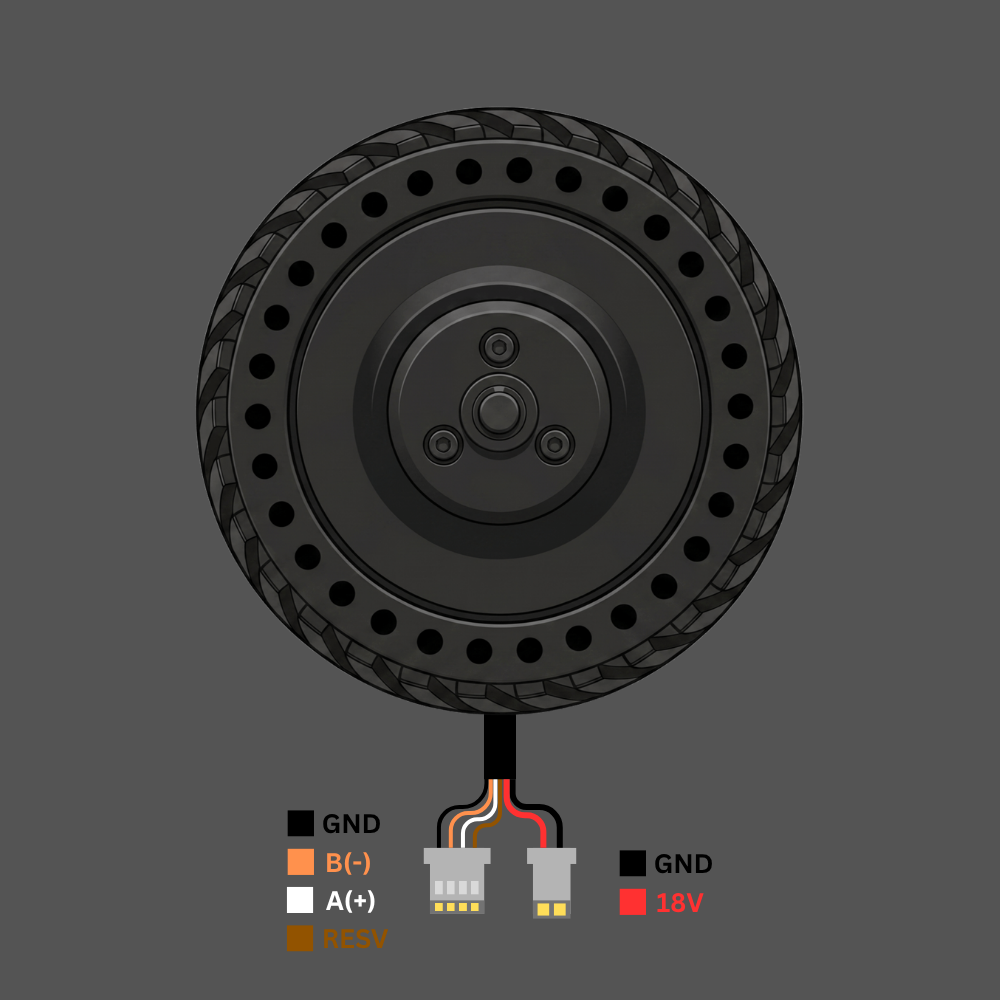
The motor has two cable connectors:
Signal Cable (4-pin JST connector)
| Wire Color | Signal | Description |
|---|---|---|
| ⬛ Black | GND | Signal ground reference |
| 🟠 Orange | B (−) | RS485 differential line B |
| ⬜ White | A (+) | RS485 differential line A |
| 🟤 Brown | RESV | Shield / reserved — connect to GND |
Power Cable (2-pin connector)
| Wire Color | Signal | Description |
|---|---|---|
| ⬛ Black | GND | Power ground |
| 🔴 Red | 18V | DC power supply positive (18V rated) |
Signal connector:       Power connector:
  ■ GND                   ■ GND
  ● B(-)                  ■ 18V
  ○ A(+)
  ■ RESV
6. Interfacing via RS485
RS485 is a differential 2-wire bus. Multiple motors can share the same A/B pair, each with a unique address (ID 0x01–0xFE).
Connection Diagram
PC / Microcontroller
        │
   USB-to-RS485 Adapter
        │
   ┌────┴────┐
   A(+)   B(-)   GND
    │       │      │
   White  Orange  Black ──► Motor Signal Connector (4-pin)
                         ──► Brown wire also to GND

   18V DC power supply ──► Red/Black Power Connector (2-pin)
Key Rules
- A/B polarity matters. If the motor doesn't respond, swap Orange and White.
- Brown wire must connect to GND — it is the RS485 signal ground reference. Leaving it floating causes communication errors, especially on longer cables.
- 18V power is separate from the RS485 logic. The motor will not spin without power even if RS485 communication is working.
- Only one motor on the bus when setting or querying IDs — address conflicts cause garbled responses.
- For cable runs longer than 1 metre, add a 120Ω termination resistor across A and B at the far end of the bus.
7. Interfacing with RainbowLink (TEL0185)
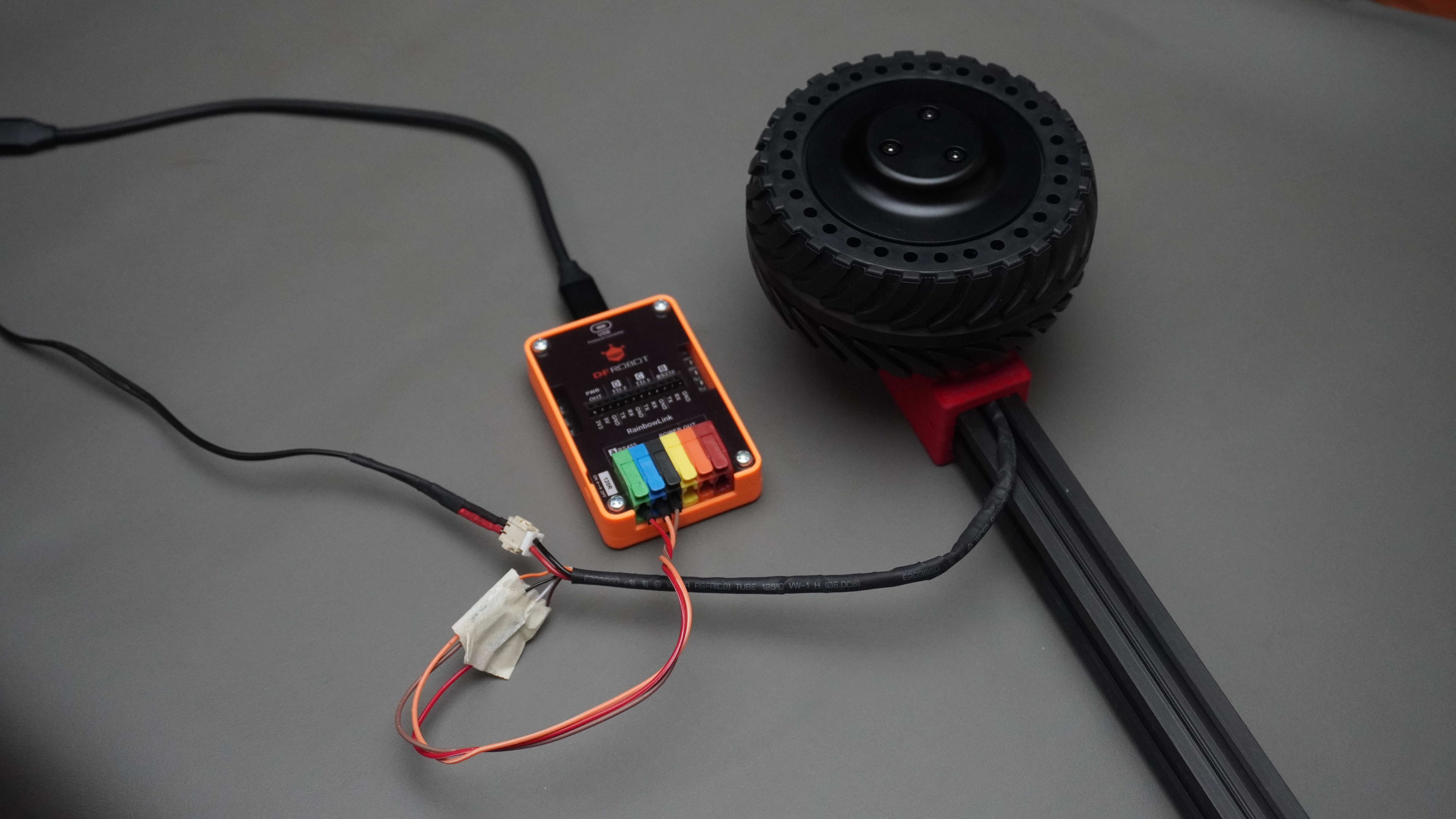
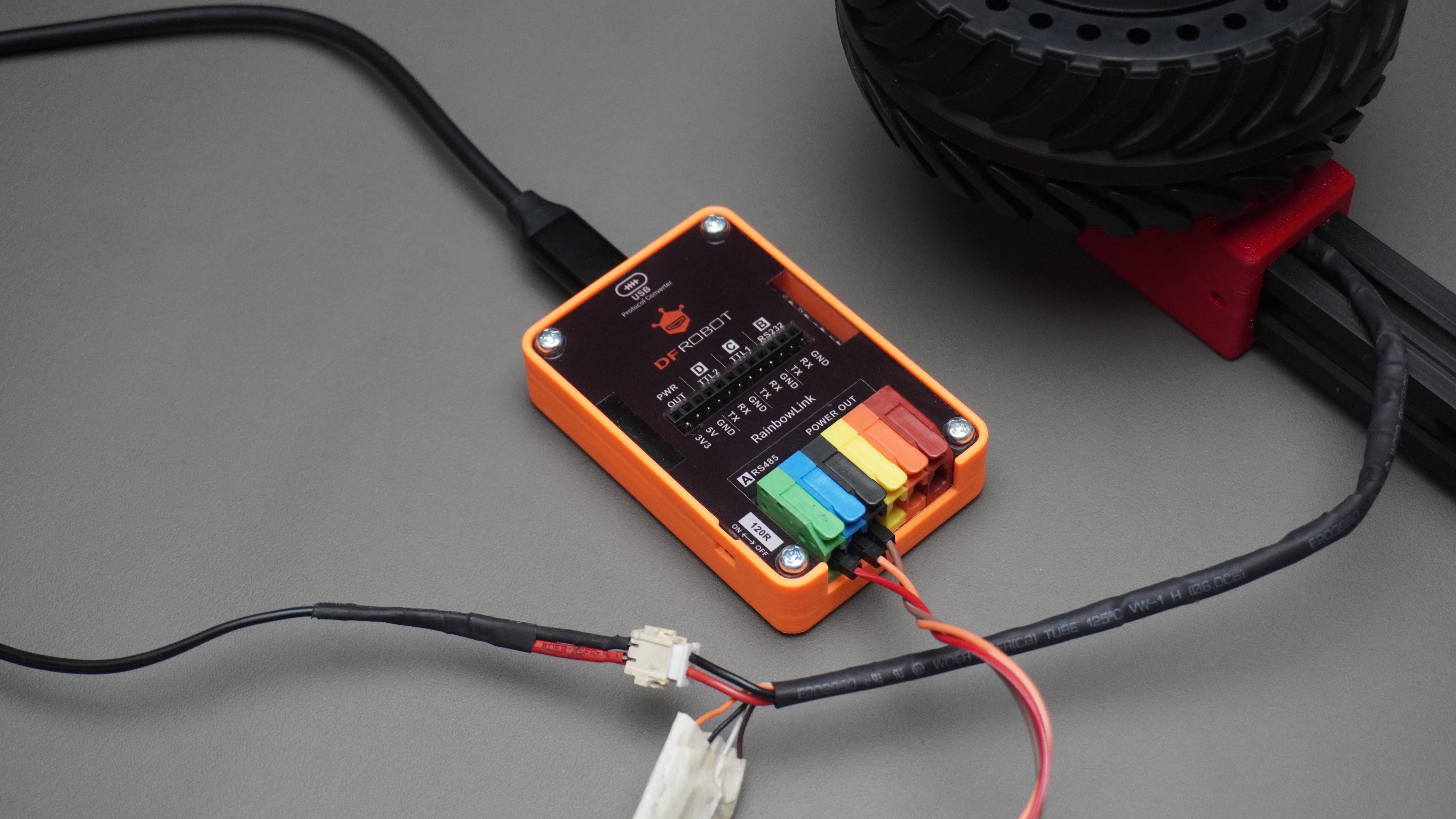
The DFRobot RainbowLink (TEL0185) is a 4-channel USB-to-multi-protocol converter supporting RS485, RS232, and TTL on a single USB connection. It is the recommended PC interface for the M0601.
Step-by-step Setup
Step 1 — Install driver
The RainbowLink uses a CH343 chipset. Install the driver from the DFRobot wiki or directly from WCH:
CH343 Driver Download
Step 2 — Connect wires
| Motor Signal Wire | Connect To |
|---|---|
| Orange (B−) | A terminal on RS485 channel |
| White (A+) | B terminal on RS485 channel |
| Black (GND) | GND terminal |
| Brown (RESV) | GND terminal (recommended) |
If the motor doesn't respond, swap Orange ↔ White — the A/B labelling on the motor is inverted relative to some converters.
Step 3 — Identify the COM port
After plugging in the RainbowLink via USB:
- Windows: Open Device Manager → Ports (COM & LPT) → note the COM number (e.g. COM13)
- Linux/Mac: Run
ls /dev/tty*and look for/dev/ttyUSB0or similar
Step 4 — Serial settings
| Setting | Value |
|---|---|
| Baud Rate | 115200 |
| Data Bits | 8 |
| Parity | None |
| Stop Bits | 1 |
| Flow Control | None / OFF |
Step 5 — Quick test with Hercules
Open Hercules SETUP utility → Serial tab → configure settings above → Open.
In the Send box, tick HEX, type the ID query frame, click Send:
C8 64 00 00 00 00 00 00 00 DE
A response in the Received window confirms the motor is wired and powered correctly.
8. Communication Protocol
All motor communication uses 10-byte frames at 115200 baud, 8N1, half-duplex RS485.
Send Frame Structure (Drive Command)
| Byte | Field | Description |
|---|---|---|
| DATA[0] | Motor ID | Target motor address (0x01–0xFE) |
| DATA[1] | Command type | 0x64 = drive, 0x74 = feedback query, 0xA0 = mode switch |
| DATA[2] | Value HIGH | High byte of INT16 payload |
| DATA[3] | Value LOW | Low byte of INT16 payload |
| DATA[4] | Reserved | Always 0x00 |
| DATA[5] | Reserved | Always 0x00 |
| DATA[6] | Acceleration | Valid in velocity mode; 0 = default (1 = 0.1ms/rpm) |
| DATA[7] | Brake | 0xFF = electric brake (velocity mode only); else 0x00 |
| DATA[8] | Reserved | Always 0x00 |
| DATA[9] | CRC8 | CRC-8/MAXIM of bytes DATA[0]–DATA[8] |
CRC-8/MAXIM Algorithm
Polynomial: x⁸ + x⁵ + x⁴ + 1 (reflected: 0x8C)
def crc8_maxim(data):
    crc = 0
    for byte in data:
        crc ^= byte
        for _ in range(8):
            crc = (crc >> 1) ^ 0x8C if (crc & 0x01) else (crc >> 1)
    return crc
You can also verify frames at https://crccalc.com/ — select CRC-8/MAXIM.
Control Modes
| Mode | Mode Byte | Value Range | Unit |
|---|---|---|---|
| Current Loop | 0x01 | −32767 to +32767 | ≈ −8A to +8A |
| Velocity Loop | 0x02 | −330 to +330 | RPM |
| Position Loop | 0x03 | 0 to 32767 | 0° to 360° |
Motor speed must be below 10 RPM before switching to Position Loop mode.
Polling Requirement
The motor uses a polling protocol. A single command does not sustain motion — the host must repeatedly send the drive command at ≥20ms intervals (50Hz recommended). Sending 0 RPM or the brake frame will halt the motor.
9. Verified Command Reference
All frames below are CRC-8/MAXIM verified.
Mode Switch
| Command | Frame (10 bytes) | Notes |
|---|---|---|
| Switch to Velocity Loop | 01 A0 00 00 00 00 00 00 00 02 | Send 3–5 times. No feedback returned. |
| Switch to Current Loop | 01 A0 00 00 00 00 00 00 00 01 | Send 3–5 times. No feedback returned. |
| Switch to Position Loop | 01 A0 00 00 00 00 00 00 00 03 | Speed must be <10 RPM first. |
Utility Commands
| Command | Frame (10 bytes) | Notes |
|---|---|---|
| Feedback Query | 01 74 00 00 00 00 00 00 00 04 | Returns 10-byte status frame |
| Brake (Velocity Mode) | 01 64 00 00 00 00 00 FF 00 D1 | Electric brake |
| ID Query (Broadcast) | C8 64 00 00 00 00 00 00 00 DE | Single motor on bus only |
| Set Motor ID to 0x01 | AA 55 53 01 00 00 00 00 00 CB | Send exactly 5 times. One motor on bus. |
Velocity Loop (−330 to +330 RPM)
| Speed | Frame |
|---|---|
| −100 RPM | 01 64 FF 9C 00 00 00 00 00 9A |
| −50 RPM | 01 64 FF CE 00 00 00 00 00 DA |
| 0 RPM | 01 64 00 00 00 00 00 00 00 50 |
| +50 RPM | 01 64 00 32 00 00 00 00 00 D3 |
| +100 RPM | 01 64 00 64 00 00 00 00 00 4F |
Current Loop (−32767 to +32767)
| Value | Approx. Current | Frame |
|---|---|---|
| −10000 | ~−2.44A | 01 64 D8 F0 00 00 00 00 00 78 |
| −5000 | ~−1.22A | 01 64 EC 78 00 00 00 00 00 D3 |
| −2000 | ~−0.49A | 01 64 F8 30 00 00 00 00 00 08 |
| 0 | 0A | 01 64 00 00 00 00 00 00 00 50 |
| +2000 | ~+0.49A | 01 64 07 D0 00 00 00 00 00 27 |
| +5000 | ~+1.22A | 01 64 13 88 00 00 00 00 00 A7 |
| +10000 | ~+2.44A | 01 64 27 10 00 00 00 00 00 57 |
Position Loop (0–32767 = 0°–360°)
| Raw Value | Angle | Frame |
|---|---|---|
| 0 | 0° | 01 64 00 00 00 00 00 00 00 50 |
| 10000 | ~109.8° | 01 64 27 10 00 00 00 00 00 57 |
| 20000 | ~219.7° | 01 64 4E 20 00 00 00 00 00 5E |
| 30000 | ~329.5° | 01 64 75 30 00 00 00 00 00 A7 |
10. Feedback Frame Decoding
The motor responds to drive commands and feedback queries with a 10-byte frame:
Protocol 1 — Drive Command Response
| Byte | Field | Decode |
|---|---|---|
| DATA[0] | Motor ID | Responding motor's address |
| DATA[1] | Mode | 0x01=Current, 0x02=Velocity, 0x03=Position |
| DATA[2–3] | Torque Current | `int16 = (D[2]<<8) |
| DATA[4–5] | Velocity | `int16 = (D[4]<<8) |
| DATA[6–7] | Position | `int16 = (D[6]<<8) |
| DATA[8] | Error Code | Bitmask (see below) |
| DATA[9] | CRC8 | CRC-8/MAXIM of DATA[0]–DATA[8] |
Protocol 2 — Feedback Query Response
| Byte | Field | Decode |
|---|---|---|
| DATA[6] | Winding Temperature | °C (uint8, direct) |
| DATA[7] | U8 Position | 0–255 → 0°–360° (degrees = value × 360 / 255) |
Error Code Bitmask
| Bit | Meaning |
|---|---|
| BIT0 | Sensor error |
| BIT1 | Overcurrent error |
| BIT2 | Phase overcurrent error |
| BIT3 | Stall / locked rotor error |
| BIT4 | Troubleshooting flag |
| BIT5–7 | Reserved |
Example: 0x22 = 0b00100010 → Phase overcurrent + Overcurrent active simultaneously.
11. Protection Rules
| Protection | Threshold | Reset |
|---|---|---|
| Bus Overcurrent | 3A | Auto after 5 seconds |
| Over-temperature | 80°C | Auto when winding temp drops below 75°C |
| Phase Overcurrent | 4.6A | Auto after 5 seconds |
| Stall (Locked Rotor) | Blocked > 5s | Auto after 5 seconds |
During a protection event the motor stops responding to drive commands. The error code byte in the feedback frame indicates which protection is active.
12. Python Code Examples
Requirement: Install pyserial before running any of these scripts.
pip install pyserialEdit the
COM_PORTvariable at the top of each script to match your system.
12.1 Motor Scan
This script performs a two-stage scan to discover all M0601 motors on the RS485 bus.
How it works:
- Stage 1 — Broadcast query: Sends the special ID query frame
C8 64 00 ... DEwhich all motors respond to simultaneously. This gives an instant result if only one motor is connected. - Stage 2 — Full poll: Iterates through every possible address from
0x01to0xFE, sending a feedback query to each and listening for a reply. This catches motors whose IDs were previously changed from the default.
The script prints a clean summary at the end listing all detected IDs, and tells you exactly what value to set MOTOR_ID to in the other scripts.
"""
m0601_scan.py — Discover all M0601 motors on the RS485 bus.

Stage 1: Broadcast ID query (fast, ~0.3s)
Stage 2: Full poll of all IDs 0x01-0xFE (thorough, ~40s at 0.15s timeout)

Usage:
    pip install pyserial
    python m0601_scan.py
"""

import serial
import time
import sys

COM_PORT  = "COM13"       # ← Change to your port (e.g. /dev/ttyUSB0 on Linux)
BAUD_RATE = 115200
TIMEOUT   = 0.15          # Seconds to wait per ID. Increase to 0.25 on noisy buses.


def crc8_maxim(data):
    """CRC-8/MAXIM: polynomial x^8 + x^5 + x^4 + 1, reflected 0x8C."""
    crc = 0
    for byte in data:
        crc ^= byte
        for _ in range(8):
            crc = (crc >> 1) ^ 0x8C if (crc & 0x01) else (crc >> 1)
    return crc

FRAME_ID_QUERY = bytes([0xC8, 0x64, 0x00, 0x00, 0x00, 0x00, 0x00, 0x00, 0x00, 0xDE])

def frame_feedback_request(motor_id):
    """Build a feedback query frame for a specific motor ID."""
    f = [motor_id, 0x74, 0x00, 0x00, 0x00, 0x00, 0x00, 0x00, 0x00]
    f.append(crc8_maxim(f))
    return bytes(f)


def stage1_broadcast(ser):
    """
    Send the broadcast ID query and parse the response.
    The motor replies with its ID in DATA[0] of the response frame.
    Returns detected ID (int) or None.
    """
    print("\n[Stage 1] Broadcast ID query...")
    ser.reset_input_buffer()
    ser.write(FRAME_ID_QUERY)
    time.sleep(0.3)

    resp = ser.read_all()
    if not resp:
        print("  No response.")
        return None

    print(f"  Raw response: {resp.hex(' ').upper()}")

    # If response is identical to our query, it's just the RS485 echo — not a motor reply.
    if bytes(resp) == FRAME_ID_QUERY:
        print("  (Echo only — motor did not respond separately)")
        return None

    # Motor reply starts with its own ID byte (0x01–0xFE)
    for byte in resp:
        if 0x01 <= byte <= 0xFE:
            print(f"  ✓ Motor found via broadcast — ID: 0x{byte:02X} ({byte})")
            return byte

    return None


def stage2_full_poll(ser):
    """
    Poll each ID from 0x01 to 0xFE individually.
    Returns a list of all responding IDs.
    """
    print("\n[Stage 2] Full ID poll (0x01 → 0xFE)...")
    print(f"  Estimated time: {254 * TIMEOUT:.0f}s — please wait.\n")
    found = []

    for motor_id in range(0x01, 0xFF):
        # Print progress bar
        pct   = motor_id / 254
        bar   = "█" * int(30 * pct) + "░" * (30 - int(30 * pct))
        print(f"\r  [{bar}] 0x{motor_id:02X} ({motor_id}/254)", end="", flush=True)

        ser.reset_input_buffer()
        ser.write(frame_feedback_request(motor_id))
        time.sleep(TIMEOUT)

        resp = ser.read_all()
        # A valid reply is 10 bytes starting with the motor's own ID
        if resp and len(resp) >= 3 and resp[0] == motor_id:
            found.append(motor_id)
            print(f"\n  ✓ Motor at ID 0x{motor_id:02X} ({motor_id}) replied!")

    print(f"\r  [{'█' * 30}] Done!                                  ")
    return found


def main():
    print("=" * 52)
    print("  M0601 Motor Scanner")
    print(f"  Port: {COM_PORT}  |  Baud: {BAUD_RATE}")
    print("=" * 52)
    print("\n  ⚠  For Stage 1, ensure only ONE motor is on the bus.")
    print("  Press Enter to start scan, Ctrl+C to cancel...")
    input()

    try:
        ser = serial.Serial(
            port=COM_PORT, baudrate=BAUD_RATE,
            bytesize=8, parity='N', stopbits=1,
            timeout=TIMEOUT
        )
        print(f"[✓] Opened {COM_PORT}")
    except serial.SerialException as e:
        print(f"[✗] Cannot open port: {e}")
        sys.exit(1)

    try:
        broadcast_id = stage1_broadcast(ser)
        polled_ids   = stage2_full_poll(ser)

        # Combine results
        all_ids = sorted(set(polled_ids) | ({broadcast_id} if broadcast_id else set()))

        print("\n" + "=" * 52)
        print("  SCAN COMPLETE")
        print("=" * 52)
        if all_ids:
            print(f"\n  {len(all_ids)} motor(s) found:")
            for mid in all_ids:
                print(f"    • ID 0x{mid:02X}  (decimal {mid})")
            if len(all_ids) == 1:
                print(f"\n  → In other scripts, set:  MOTOR_ID = 0x{all_ids[0]:02X}")
        else:
            print("\n  ✗ No motors detected.")
            print("  Checklist:")
            print("    1. Is the 18V power adapter ON?")
            print("    2. Is the Brown wire connected to GND?")
            print("    3. Try swapping Orange ↔ White (A/B polarity)")
            print(f"    4. Try increasing TIMEOUT (currently {TIMEOUT}s)")
        print("=" * 52)

    except KeyboardInterrupt:
        print("\n[!] Scan cancelled.")
    finally:
        ser.close()
        print("[✓] Port closed.")


if __name__ == "__main__":
    main()
12.2 Motor Operations
This script demonstrates all three control modes interactively from the keyboard — the most complete starting point for testing motor behaviour.
How it works:
- On startup it opens the serial port and sends the ID query to confirm the motor is online.
- It switches to Velocity Loop mode by default (the motor's factory default).
- A polling loop runs in the background at 50Hz, continuously sending the current command frame. This is required because the M0601 uses a polling protocol — it will not sustain motion from a single command.
- Keyboard input changes the active command, mode, or stops the motor. The polling loop picks up the new command on the very next iteration without interruption.
"""
m0601_operations.py — Interactive motor control in all three modes.

Controls:
  F / B  — Forward / Backward at SPIN_RPM (velocity mode)
  1..5   — Velocity presets: 50, 100, 150, 200, 250 RPM
  S      — Stop (velocity = 0)
  K      — Brake (electric brake)
  V      — Switch to Velocity Loop mode
  C      — Switch to Current Loop mode
  P      — Switch to Position Loop mode
  I      — Query feedback (print once)
  Q      — Quit

Usage:
    pip install pyserial
    python m0601_operations.py
"""

import serial
import time
import sys
import os
import threading

COM_PORT   = "COM13"
BAUD_RATE  = 115200
MOTOR_ID   = 0x01
SPIN_RPM   = 100        # Default speed for F/B keys
POLL_HZ    = 50         # Polling frequency in Hz


def crc8_maxim(data):
    crc = 0
    for byte in data:
        crc ^= byte
        for _ in range(8):
            crc = (crc >> 1) ^ 0x8C if (crc & 0x01) else (crc >> 1)
    return crc


def build(motor_id, b1, data7):
    """Build a standard 10-byte frame: [ID, B1, 7 data bytes, CRC]."""
    f = [motor_id, b1] + list(data7)
    f.append(crc8_maxim(f))
    return bytes(f)


def frame_velocity_mode(motor_id):
    """Switch to velocity loop (mode 0x02). No CRC on last byte — use exact bytes."""
    return bytes([motor_id, 0xA0, 0x00, 0x00, 0x00, 0x00, 0x00, 0x00, 0x00, 0x02])

def frame_current_mode(motor_id):
    """Switch to current loop (mode 0x01)."""
    return bytes([motor_id, 0xA0, 0x00, 0x00, 0x00, 0x00, 0x00, 0x00, 0x00, 0x01])

def frame_position_mode(motor_id):
    """Switch to position loop (mode 0x03). Motor must be <10 RPM first."""
    return bytes([motor_id, 0xA0, 0x00, 0x00, 0x00, 0x00, 0x00, 0x00, 0x00, 0x03])

def frame_velocity(motor_id, rpm, accel=1):
    """Velocity command. rpm: -330 to +330."""
    rpm  = max(-330, min(330, rpm))
    v    = rpm.to_bytes(2, 'big', signed=True)
    return build(motor_id, 0x64, [v[0], v[1], accel, 0x00, 0x00, 0x00, 0x00])

def frame_current(motor_id, value):
    """Current command. value: -32767 to +32767 (= -8A to +8A)."""
    value = max(-32767, min(32767, value))
    v     = value.to_bytes(2, 'big', signed=True)
    return build(motor_id, 0x64, [v[0], v[1], 0x00, 0x00, 0x00, 0x00, 0x00])

def frame_position(motor_id, pos):
    """Position command. pos: 0 to 32767 (= 0° to 360°)."""
    pos = max(0, min(32767, pos))
    v   = pos.to_bytes(2, 'big', signed=False)
    return build(motor_id, 0x64, [v[0], v[1], 0x00, 0x00, 0x00, 0x00, 0x00])

def frame_brake(motor_id):
    """Electric brake. Valid in velocity mode only."""
    return build(motor_id, 0x64, [0x00, 0x00, 0x00, 0x00, 0x00, 0xFF, 0x00])

def frame_feedback(motor_id):
    """Request full feedback (speed, current, position, temp, error)."""
    return build(motor_id, 0x74, [0x00] * 7)

def frame_id_query():
    return bytes([0xC8, 0x64, 0x00, 0x00, 0x00, 0x00, 0x00, 0x00, 0x00, 0xDE])


def decode_feedback(data):
    """Parse a 10-byte Protocol-2 feedback frame into a readable dict."""
    if len(data) < 10:
        return None
    mode_map = {0x01: "Current", 0x02: "Velocity", 0x03: "Position"}
    raw_cur  = int.from_bytes(data[2:4], 'big', signed=True)
    raw_vel  = int.from_bytes(data[4:6], 'big', signed=True)
    temp_c   = data[6]
    u8_pos   = data[7]
    err      = data[8]
    return {
        "id":       data[0],
        "mode":     mode_map.get(data[1], f"0x{data[1]:02X}"),
        "current_a": round(raw_cur * 8.0 / 32767, 3),
        "speed_rpm": raw_vel,
        "temp_c":    temp_c,
        "position_deg": round(u8_pos * 360.0 / 255, 1),
        "error":    f"0x{err:02X}" + (" (OK)" if err == 0 else " ⚠ FAULT"),
    }


def getch():
    """Read a single keypress without pressing Enter (cross-platform)."""
    if os.name == 'nt':
        import msvcrt
        return msvcrt.getch().decode('utf-8', errors='ignore').upper()
    else:
        import tty, termios
        fd  = sys.stdin.fileno()
        old = termios.tcgetattr(fd)
        try:
            tty.setraw(fd)
            return sys.stdin.read(1).upper()
        finally:
            termios.tcsetattr(fd, termios.TCSADRAIN, old)


def main():
    print("=" * 54)
    print("  M0601 Motor Operations — Interactive Control")
    print(f"  Port: {COM_PORT}  ID: 0x{MOTOR_ID:02X}  Default: {SPIN_RPM} RPM")
    print("=" * 54)

    try:
        ser = serial.Serial(
            port=COM_PORT, baudrate=BAUD_RATE,
            bytesize=8, parity='N', stopbits=1, timeout=0.3
        )
        print(f"[✓] Opened {COM_PORT}")
    except serial.SerialException as e:
        print(f"[✗] {e}")
        sys.exit(1)

    # Confirm motor is online
    print("[*] Checking for motor...")
    ser.reset_input_buffer()
    ser.write(frame_id_query())
    time.sleep(0.3)
    resp = ser.read_all()
    if resp:
        print(f"[✓] Motor responded: {resp.hex(' ').upper()}")
    else:
        print("[!] No motor response — check wiring and 18V power.")

    # Switch to velocity mode and initialise polling state
    for _ in range(5):
        ser.write(frame_velocity_mode(MOTOR_ID))
        time.sleep(0.02)
    print("[✓] Velocity loop mode set.\n")

    # Shared state between main thread (keyboard) and poll thread (serial writes)
    state = {
        "frame":   frame_velocity(MOTOR_ID, 0),   # Current frame to poll
        "polling": True,                            # Polling active flag
        "running": True,                            # Application running flag
        "mode":    "velocity",
    }
    lock = threading.Lock()

    def poll_loop():
        """Background thread: sends state['frame'] at POLL_HZ."""
        interval = 1.0 / POLL_HZ
        while state["running"]:
            with lock:
                if state["polling"]:
                    try:
                        ser.write(state["frame"])
                    except Exception:
                        pass
            time.sleep(interval)

    poll_thread = threading.Thread(target=poll_loop, daemon=True)
    poll_thread.start()

    print("Controls:")
    print("  F/B     Forward / Backward")
    print("  1-5     Speed presets (50/100/150/200/250 RPM)")
    print("  S       Stop   K  Brake")
    print("  V/C/P   Switch mode: Velocity / Current / Position")
    print("  I       Print live feedback")
    print("  Q       Quit\n")

    try:
        while True:
            print("Key: ", end="", flush=True)
            key = getch()
            print(key)

            with lock:
                if key == 'F':
                    state["frame"]   = frame_velocity(MOTOR_ID, SPIN_RPM)
                    state["polling"] = True
                    print(f"  ► Forward {SPIN_RPM} RPM")

                elif key == 'B':
                    state["frame"]   = frame_velocity(MOTOR_ID, -SPIN_RPM)
                    state["polling"] = True
                    print(f"  ◄ Backward {SPIN_RPM} RPM")

                elif key in ('1', '2', '3', '4', '5'):
                    rpm = int(key) * 50
                    state["frame"]   = frame_velocity(MOTOR_ID, rpm)
                    state["polling"] = True
                    print(f"  ► {rpm} RPM")

                elif key == 'S':
                    state["frame"]   = frame_velocity(MOTOR_ID, 0)
                    state["polling"] = True
                    print("  ■ Stopped (velocity = 0)")

                elif key == 'K':
                    state["frame"]   = frame_brake(MOTOR_ID)
                    state["polling"] = True
                    print("  ■ Brake applied")

                elif key == 'V':
                    state["mode"] = "velocity"
                    state["polling"] = False
                for _ in range(5):
                    ser.write(frame_velocity_mode(MOTOR_ID))
                    time.sleep(0.02)
                print("  ✓ Velocity Loop mode")

                elif key == 'C':
                    state["mode"] = "current"
                    state["polling"] = False
                    for _ in range(5):
                        ser.write(frame_current_mode(MOTOR_ID))
                        time.sleep(0.02)
                    state["frame"]   = frame_current(MOTOR_ID, 0)
                    state["polling"] = True
                    print("  ✓ Current Loop mode — sending 0A")

                elif key == 'P':
                    state["mode"] = "position"
                    state["polling"] = False
                    for _ in range(5):
                        ser.write(frame_position_mode(MOTOR_ID))
                        time.sleep(0.02)
                    pos = int(input("  Enter position (0–32767): "))
                    state["frame"]   = frame_position(MOTOR_ID, pos)
                    state["polling"] = True
                    print(f"  ✓ Position Loop — targeting {pos} ({pos*360/32767:.1f}°)")

                elif key == 'I':
                    state["polling"] = False
                    time.sleep(0.05)
                    ser.reset_input_buffer()
                    ser.write(frame_feedback(MOTOR_ID))
                    time.sleep(0.2)
                    resp = ser.read_all()
                    if resp and len(resp) >= 10:
                        fb = decode_feedback(resp[:10])
                        if fb:
                            print(f"  Mode:     {fb['mode']}")
                            print(f"  Speed:    {fb['speed_rpm']} RPM")
                            print(f"  Current:  {fb['current_a']} A")
                            print(f"  Position: {fb['position_deg']}°")
                            print(f"  Temp:     {fb['temp_c']} °C")
                            print(f"  Error:    {fb['error']}")
                    else:
                        print("  ✗ No feedback received")
                    state["polling"] = True

                elif key == 'Q':
                    state["frame"]   = frame_velocity(MOTOR_ID, 0)
                    time.sleep(0.1)
                    for _ in range(5):
                        ser.write(frame_brake(MOTOR_ID))
                        time.sleep(0.02)
                    state["running"] = False
                    break

    except KeyboardInterrupt:
        print("\n[!] Interrupted")
    finally:
        state["running"] = False
        time.sleep(0.1)
        ser.close()
        print("[✓] Port closed. Goodbye!")


if __name__ == "__main__":
    main()
12.3 Motor ID Change
This script safely changes a motor's ID address on the RS485 bus.
How it works:
- It first queries the bus to confirm exactly one motor is present and reads its current ID.
- It then sends the ID set frame (
AA 55 53 [NEW_ID] 00 00 00 00 00 00) exactly 5 consecutive times — the motor requires 5 consecutive identical frames to commit the new ID to non-volatile memory. - After setting, it immediately sends an ID query to verify the new ID is active.
⚠️ Only one motor must be connected to the bus during this operation. If multiple motors are present, they will all receive the same new ID and conflict on the bus.
"""
m0601_set_id.py — Change the RS485 ID of one M0601 motor.

⚠  Connect only ONE motor to the bus before running.
⚠  The motor saves the ID when powered off (non-volatile).

Usage:
    pip install pyserial
    python m0601_set_id.py
"""

import serial
import time
import sys

COM_PORT     = "COM13"       # ← Change to your port
BAUD_RATE    = 115200
NEW_MOTOR_ID = 0x01          # ← Change to the ID you want to assign (0x01–0xFE)


def crc8_maxim(data):
    crc = 0
    for byte in data:
        crc ^= byte
        for _ in range(8):
            crc = (crc >> 1) ^ 0x8C if (crc & 0x01) else (crc >> 1)
    return crc


FRAME_ID_QUERY = bytes([0xC8, 0x64, 0x00, 0x00, 0x00, 0x00, 0x00, 0x00, 0x00, 0xDE])


def build_id_set_frame(new_id):
    """
    ID set frame: AA 55 53 [ID] 00 00 00 00 00 00
    Note: This frame has NO CRC — the last byte is always 0x00.
    Must be sent exactly 5 times in a row.
    """
    assert 0x01 <= new_id <= 0xFE, "ID must be 0x01 to 0xFE"
    return bytes([0xAA, 0x55, 0x53, new_id, 0x00, 0x00, 0x00, 0x00, 0x00, 0x00])


def query_current_id(ser):
    """Send broadcast query and return the detected motor ID, or None."""
    ser.reset_input_buffer()
    ser.write(FRAME_ID_QUERY)
    time.sleep(0.3)
    resp = ser.read_all()
    if not resp or bytes(resp) == FRAME_ID_QUERY:
        return None
    # Motor ID is the first non-echo byte in the 0x01–0xFE range
    for byte in resp:
        if 0x01 <= byte <= 0xFE:
            return byte
    return None


def main():
    print("=" * 52)
    print("  M0601 Motor ID Changer")
    print(f"  Port: {COM_PORT}  →  New ID: 0x{NEW_MOTOR_ID:02X} ({NEW_MOTOR_ID})")
    print("=" * 52)
    print()
    print("  ⚠  ONLY ONE MOTOR MUST BE CONNECTED TO THE BUS.")
    print("  ⚠  The new ID is saved permanently (survives power-off).")
    print()

    try:
        ser = serial.Serial(
            port=COM_PORT, baudrate=BAUD_RATE,
            bytesize=8, parity='N', stopbits=1, timeout=0.3
        )
        print(f"[✓] Opened {COM_PORT}")
    except serial.SerialException as e:
        print(f"[✗] Cannot open port: {e}")
        sys.exit(1)

    # Step 1: Confirm one motor is present and read current ID
    print("\n[Step 1] Scanning for motor...")
    current_id = query_current_id(ser)
    if current_id is None:
        print("[✗] No motor detected.")
        print("    Check: 18V power ON? Wiring correct? Brown wire to GND?")
        ser.close()
        sys.exit(1)

    print(f"[✓] Motor detected — current ID: 0x{current_id:02X} ({current_id})")

    if current_id == NEW_MOTOR_ID:
        print(f"[!] Motor already has ID 0x{NEW_MOTOR_ID:02X}. Nothing to do.")
        ser.close()
        sys.exit(0)

    # Step 2: Confirm with user
    print(f"\n[Step 2] Ready to change ID: 0x{current_id:02X} → 0x{NEW_MOTOR_ID:02X}")
    confirm = input("  Type 'yes' to confirm: ").strip().lower()
    if confirm != 'yes':
        print("[!] Cancelled.")
        ser.close()
        sys.exit(0)

    # Step 3: Send ID set frame exactly 5 times
    print("\n[Step 3] Sending ID set frame ×5...")
    id_frame = build_id_set_frame(NEW_MOTOR_ID)
    print(f"  Frame: {id_frame.hex(' ').upper()}")

    for i in range(1, 6):
        ser.write(id_frame)
        print(f"  Sent {i}/5")
        time.sleep(0.05)   # Small gap between frames

    print("\n[Step 4] Waiting for motor to save ID (power-cycle not needed)...")
    time.sleep(0.5)

    # Step 4: Verify new ID
    print("[Step 4] Verifying new ID...")
    verified_id = query_current_id(ser)

    if verified_id == NEW_MOTOR_ID:
        print(f"\n[✓] SUCCESS — Motor ID is now 0x{NEW_MOTOR_ID:02X} ({NEW_MOTOR_ID})")
        print(f"    Update MOTOR_ID = 0x{NEW_MOTOR_ID:02X} in your other scripts.")
    elif verified_id is not None:
        print(f"\n[✗] Motor responded with ID 0x{verified_id:02X} — ID change may have failed.")
        print("    Try power-cycling the motor and running this script again.")
    else:
        print("\n[?] No response after ID change.")
        print("    Try power-cycling the motor — the new ID may have been saved.")
        print(f"    Run m0601_scan.py after power-cycling to confirm.")

    ser.close()
    print("[✓] Port closed.")


if __name__ == "__main__":
    main()
12.4 Motor Parameter Monitoring
This script continuously polls the motor's feedback frame and prints a live terminal dashboard showing all real-time parameters: speed, current, position, winding temperature, and fault status.
How it works:
- Sends the Protocol-2 feedback query frame (
01 74 00 ... 04) at a configurable interval (default 200ms). - Parses each 10-byte response to extract: mode, torque current (INT16 → Amps), velocity (INT16 → RPM), winding temperature (°C), angular position (U8 → degrees), and the error code bitmask.
- Decodes the error bitmask into named fault descriptions.
- Prints an updating single-line dashboard that overwrites itself in the terminal.
- Logs all readings to a CSV file for later analysis.
"""
m0601_monitor.py — Live parameter monitoring with CSV logging.

Polls the motor feedback at configurable interval and displays:
  Mode | Speed (RPM) | Current (A) | Position (°) | Temp (°C) | Errors

Also writes all readings to motor_log.csv for offline analysis.

Usage:
    pip install pyserial
    python m0601_monitor.py
    Press Ctrl+C to stop.
"""

import serial
import time
import sys
import csv
import os
from datetime import datetime

COM_PORT      = "COM13"     # ← Change to your port
BAUD_RATE     = 115200
MOTOR_ID      = 0x01
POLL_INTERVAL = 0.2         # Seconds between feedback queries (5Hz default)
LOG_FILE      = "motor_log.csv"


def crc8_maxim(data):
    crc = 0
    for byte in data:
        crc ^= byte
        for _ in range(8):
            crc = (crc >> 1) ^ 0x8C if (crc & 0x01) else (crc >> 1)
    return crc


def frame_feedback_query(motor_id):
    """Protocol 2 feedback request: returns speed, current, temp, position, error."""
    f = [motor_id, 0x74, 0x00, 0x00, 0x00, 0x00, 0x00, 0x00, 0x00]
    f.append(crc8_maxim(f))
    return bytes(f)


def decode_error(code):
    """Decode error bitmask into a human-readable string."""
    if code == 0:
        return "OK"
    errors = []
    if code & 0x01: errors.append("SensorErr")
    if code & 0x02: errors.append("Overcurrent")
    if code & 0x04: errors.append("PhaseOvercurrent")
    if code & 0x08: errors.append("Stall")
    if code & 0x10: errors.append("Troubleshoot")
    return " | ".join(errors)


def parse_feedback(data):
    """
    Parse a 10-byte Protocol-2 feedback frame.
    Returns a dict with all motor parameters, or None on invalid data.
    """
    if len(data) < 10:
        return None

    motor_id = data[0]
    mode_raw = data[1]
    mode_map = {0x01: "Current ", 0x02: "Velocity", 0x03: "Position"}
    mode_str = mode_map.get(mode_raw, f"Unk(0x{mode_raw:02X})")

    # Torque current: signed INT16, big-endian, bytes 2-3
    raw_current = int.from_bytes(data[2:4], byteorder='big', signed=True)
    current_a   = round(raw_current * 8.0 / 32767.0, 3)

    # Velocity: signed INT16, big-endian, bytes 4-5
    speed_rpm = int.from_bytes(data[4:6], byteorder='big', signed=True)

    # Winding temperature: uint8, byte 6
    temp_c = data[6]

    # U8 position: uint8, byte 7 — 0-255 maps to 0°-360°
    u8_pos       = data[7]
    position_deg = round(u8_pos * 360.0 / 255.0, 1)

    # Error code bitmask: byte 8
    error_raw = data[8]
    error_str = decode_error(error_raw)

    return {
        "timestamp":    datetime.now().strftime("%H:%M:%S.%f")[:-3],
        "motor_id":     motor_id,
        "mode":         mode_str,
        "speed_rpm":    speed_rpm,
        "current_a":    current_a,
        "temp_c":       temp_c,
        "position_deg": position_deg,
        "error_code":   f"0x{error_raw:02X}",
        "error_str":    error_str,
        "raw_hex":      data[:10].hex(' ').upper(),
    }


def print_dashboard(fb, count):
    """Print a compact, self-overwriting dashboard line."""
    fault_indicator = "🔴 FAULT" if fb['error_str'] != "OK" else "🟢 OK   "
    line = (
        f"\r[{fb['timestamp']}] #{count:5d} | "
        f"Mode: {fb['mode']} | "
        f"Speed: {fb['speed_rpm']:+5d} RPM | "
        f"Current: {fb['current_a']:+6.3f} A | "
        f"Pos: {fb['position_deg']:6.1f}° | "
        f"Temp: {fb['temp_c']:3d}°C | "
        f"{fault_indicator}"
        + (f" ({fb['error_str']})" if fb['error_str'] != "OK" else "")
    )
    print(line, end="", flush=True)


def main():
    print("=" * 70)
    print("  M0601 Motor Parameter Monitor")
    print(f"  Port: {COM_PORT}  |  Motor ID: 0x{MOTOR_ID:02X}  |  Poll: {POLL_INTERVAL*1000:.0f}ms")
    print(f"  Logging to: {os.path.abspath(LOG_FILE)}")
    print("=" * 70)
    print("  Press Ctrl+C to stop.\n")

    try:
        ser = serial.Serial(
            port=COM_PORT, baudrate=BAUD_RATE,
            bytesize=8, parity='N', stopbits=1, timeout=0.3
        )
        print(f"[✓] Opened {COM_PORT}")
    except serial.SerialException as e:
        print(f"[✗] Cannot open port: {e}")
        sys.exit(1)

    query_frame = frame_feedback_query(MOTOR_ID)
    count        = 0
    no_resp_count = 0

    # Open CSV log file
    csv_fields = [
        "timestamp", "motor_id", "mode", "speed_rpm",
        "current_a", "temp_c", "position_deg",
        "error_code", "error_str", "raw_hex"
    ]
    log_file = open(LOG_FILE, 'w', newline='')
    writer   = csv.DictWriter(log_file, fieldnames=csv_fields)
    writer.writeheader()

    print(f"\n{'Timestamp':14s} {'#':>6s}  Mode      Speed    Current  Position  Temp  Status")
    print("-" * 80)

    try:
        while True:
            ser.reset_input_buffer()
            ser.write(query_frame)
            time.sleep(POLL_INTERVAL)

            resp = ser.read_all()
            if not resp or len(resp) < 10:
                no_resp_count += 1
                if no_resp_count >= 5:
                    print(f"\r[!] No response for {no_resp_count} consecutive polls — check motor power.", end="")
                continue

            no_resp_count = 0
            count += 1
            fb = parse_feedback(resp[:10])
            if not fb:
                continue

            print_dashboard(fb, count)
            writer.writerow({k: fb[k] for k in csv_fields})
            log_file.flush()

    except KeyboardInterrupt:
        print("\n\n[✓] Monitoring stopped.")
    finally:
        log_file.close()
        ser.close()
        print(f"[✓] Log saved to {LOG_FILE}")
        print(f"[✓] {count} readings recorded.")
        print("[✓] Port closed.")


if __name__ == "__main__":
    main()
Sample terminal output:
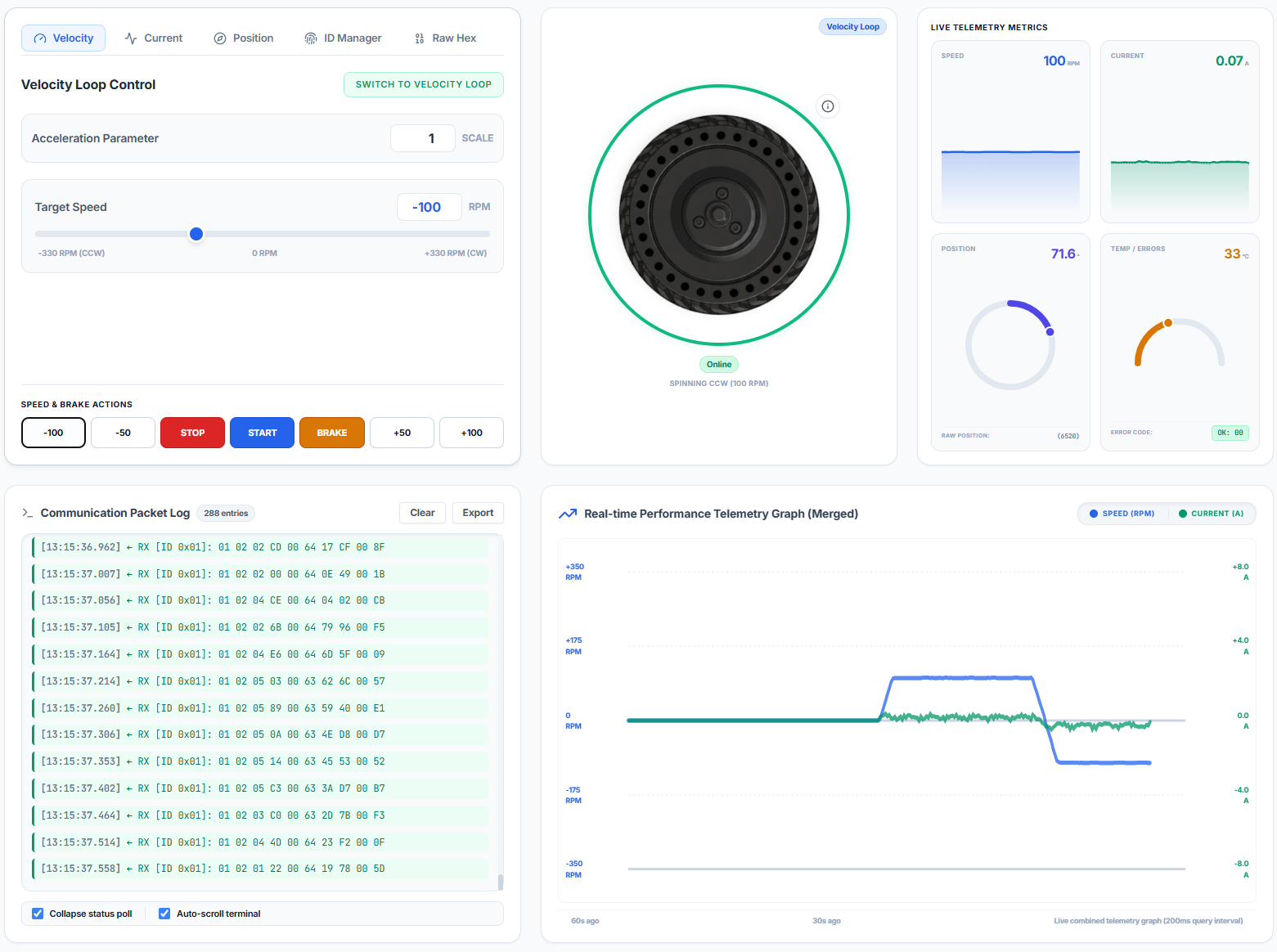
[13:15:36.962] # 288 Mode: Velocity | Speed: +100 RPM | Current: +0.070 A | Pos: 71.6° | Temp: 33°C | 🟢 OK
Sample CSV output:
timestamp,motor_id,mode,speed_rpm,current_a,temp_c,position_deg,error_code,error_str,raw_hex
13:15:36.962,1,Velocity,100,0.07,33,71.6,0x00,OK,01 02 00 0A 00 64 21 59 00 F5
13. MotorLink — Web Control Application
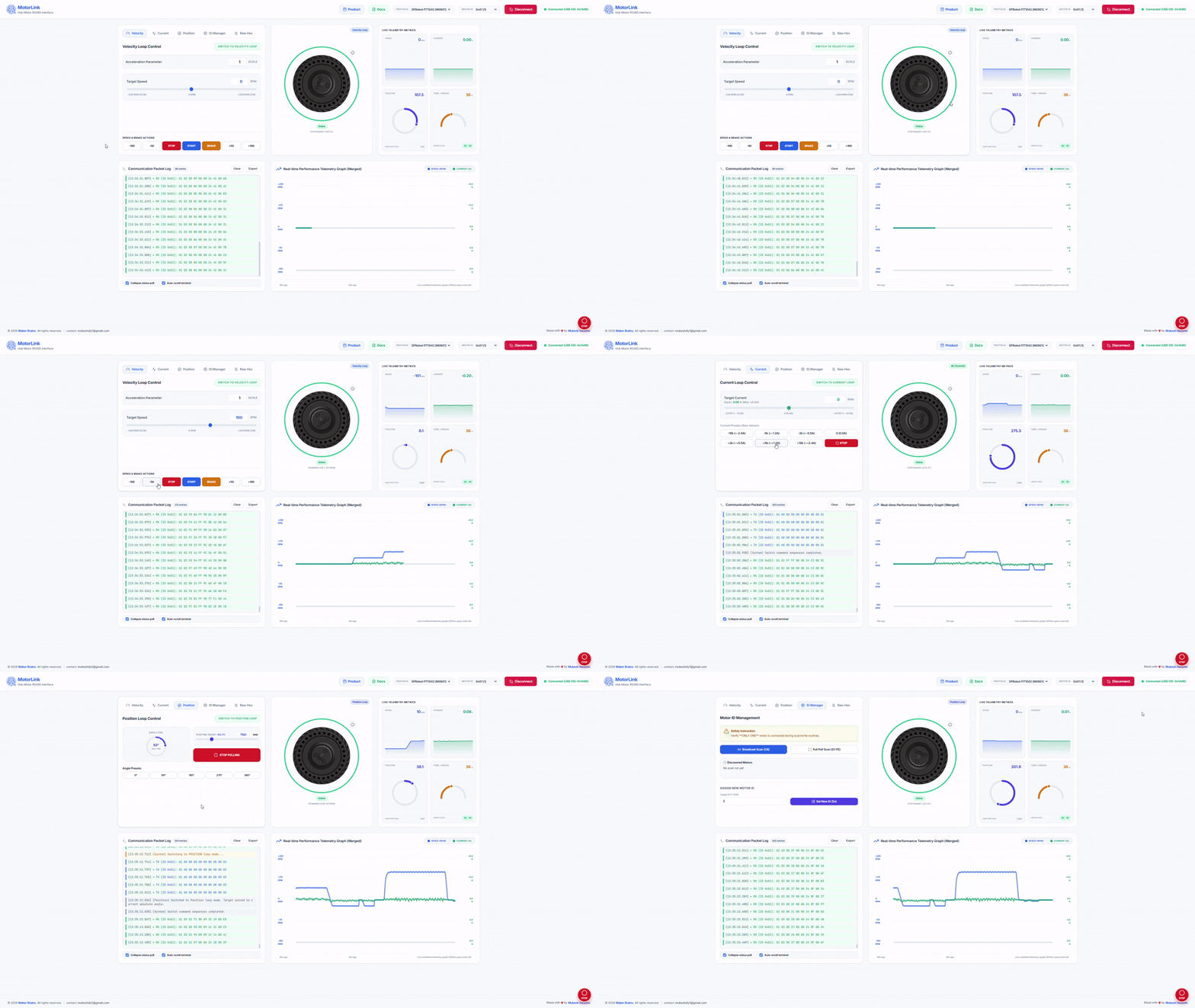
Working with raw RS485 hex frames manually is error-prone and slow. To solve this, MotorLink was built as a free, open browser-based application that handles all the protocol complexity automatically.
🔗 Live App: https://mukeshsankhla.github.io/MotorLink/
Compatible Motors
| Motor | Manufacturer | Protocol |
|---|---|---|
| M0601 (FIT1042) | DFRobot | Supported ✅ |
| DDSM115 | Waveshare | Supported ✅ |
How It Works
MotorLink runs entirely in the browser using the Web Serial API — no installation, no backend, no drivers beyond the USB-RS485 adapter driver.
Browser (MotorLink) ──► Web Serial API ──► COM Port ──► RainbowLink TEL0185 ──► RS485 ──► M0601 Motor
Getting Started
- Connect the M0601 to your RainbowLink as described in Section 7
- Power the motor from an 18V DC supply
- Open https://mukeshsankhla.github.io/MotorLink/ in Chrome or Edge
- Click Connect, select your COM port from the browser dialog, click Open
- MotorLink automatically sends an ID query and reads the motor's current parameters — the UI adjusts itself to match the motor's active mode
⚠️ Web Serial API is supported in Chrome 89+ and Edge 89+ only. Firefox and Safari are not supported.
Features
🔌 Auto-initialization
On connect, MotorLink automatically sends the broadcast ID query and reads the motor's current operating mode. The UI sets itself to match — no manual configuration needed.
🌀 Digital Twin Motor Visualization
The centre panel displays a real-time digital twin of the physical motor — a rendered hub wheel that rotates in sync with the actual motor. The rotation speed, direction (CW/CCW), and status (STATIONARY / SPINNING / BRAKING) all reflect the live feedback from the motor. When the motor spins at 100 RPM counter-clockwise, the on-screen wheel spins at the same rate and direction, giving you an immediate visual confirmation of what the physical motor is doing without looking away from the interface.
⚡ Velocity Loop Control
- RPM slider: −330 to +330
- Quick action buttons: −100, −50, STOP, START, BRAKE, +50, +100
- Configurable acceleration parameter
- Polls at 50Hz while active
- Electric brake with a single click
🔋 Current Loop Control
- Current slider: −32767 to +32767 (displayed as Amps)
- Preset buttons for common torque values
- Ideal for torque-controlled applications like robot joints and exoskeletons
🎯 Position Loop Control
- Target position input with raw value and live degree display
- Commands the motor to rotate to an exact angular position
- Motor speed must be below 10 RPM before switching to this mode
🪪 ID Manager
- Scan — broadcasts ID query and reports detected motor with its current ID
- Full scan — polls all addresses 0x01–0xFE to find all motors on the bus
- Set ID — change motor address; sends the command 5× automatically and shows a single-motor warning before proceeding
📡 Raw Hex Editor
- Type any 9-byte command frame in hex
- CRC-8/MAXIM automatically computed and appended, showing the full 10-byte frame
- Send once or in a configurable repeating loop
📊 Live Telemetry Metrics
- Speed — real-time RPM value + mini line chart
- Current — real-time Amps value + mini line chart
- Position — raw value + degrees + circular dial gauge that mirrors the motor's actual angle
- Temperature — winding temperature in °C with a gauge arc
- Error Code — displayed as hex with decoded fault names (Overcurrent, Stall, Phase Overcurrent, Sensor Error)
📈 Real-time Performance Graph
Combined speed and current telemetry plotted on a shared time axis, updating at 200ms intervals. The graph retains the last 60 seconds of data, making it easy to observe acceleration ramps, load changes, and thermal step responses.
📋 Communication Packet Log
- Every sent and received frame logged with millisecond-precision timestamps
- Colour-coded entries: TX (blue) / RX (green) / System (grey) / Error (red)
- Collapse status poll checkbox — suppresses high-frequency polling entries so you can read meaningful events without scrolling through thousands of identical lines
- Auto-scroll checkbox — keeps the log pinned to the latest entry
- Export button — download the full log as a CSV file for offline analysis
14. Safety Notice
⚠️ Read before operating the motor.
- The motor will start rotating after certain commands are sent. Do not touch any rotating parts.
- If the motor is not secured to a frame or chassis, always be ready to cut power immediately.
- Start with low speeds (50–100 RPM) when testing for the first time.
- The motor generates significant torque. Ensure it is firmly mounted before commanding movement.
- In case of unexpected behaviour, use the red STOP button in MotorLink, or disconnect the 18V power supply.
- Never exceed 18V on the power supply.
- Allow the motor to cool if the winding temperature exceeds 70°C — protection triggers at 80°C.
- The motor must be stationary (< 10 RPM) before switching to Position Loop mode.
15. License and Policy of Use
This project and the MotorLink application are licensed under the Creative Commons Attribution-NonCommercial-ShareAlike 4.0 International License (CC-BY-NC-SA 4.0).
Under this license, you are free to:
- Share — copy and redistribute the material in any medium or format.
- Adapt — remix, transform, and build upon the material.
Under the following terms:
- Attribution — You must give appropriate credit, provide a link to the license, and indicate if changes were made.
- NonCommercial — You may not use the material for commercial purposes.
- ShareAlike — If you remix, transform, or build upon the material, you must distribute your contributions under the same license as the original.
Compatible with Waveshare DDSM115.
Protocol reference: https://wiki.dfrobot.com/fit1042/docs/23322
Made with ❤ by Mukesh Sankhla
Discussion
No comments yet
Be the first to share your feedback or ask a question about this project.